Running several pharmacy locations through the same software creates problems that do not exist at a single site. Inventory is physically distributed, some settings differ by location, and a workflow that starts in one pharmacy may involve another before it is complete. At the same time, the business may need shared patient information, common access management, and a consolidated view of operations.
The challenge for multi-location pharmacy management software is deciding where those boundaries sit. Centralizing everything can strip away location-specific information, while keeping every location isolated makes cross-location work harder to manage. The system needs to support both shared and local responsibilities without making it unclear who owns a transaction, inventory record, or workflow.
What changes when pharmacy software supports multiple locations
In a single-location pharmacy management system, location is usually obvious. Stock, transactions, settings, and workflows all belong to the same pharmacy. With multiple locations, location becomes part of the data and workflow rather than an assumption the software can make.
Some information and settings can be shared across the pharmacy business, while others need to remain location-specific. The same applies to workflows. Some stay within one pharmacy, while others involve two or more locations. These boundaries affect inventory, prescriptions, integrations, permissions, and reporting.
Centralized and location-specific data
Centralized management does not mean turning every record into business-wide data. Pharmacy software still needs to preserve location information wherever it affects access, ownership, or the current state of an operation.
| Data area | Shared across the pharmacy business | Tied to a specific location |
| Patient data | Shared patient record or visibility where appropriate | Access and update permissions |
| Prescription data | Visibility across authorized locations where supported | Workflow state and responsible location |
| Inventory | Network-wide visibility | Stock quantities and inventory state |
| Configuration | Common defaults and policies | Local settings and overrides |
| Users and permissions | Shared user identity | Role and access scope by location |
The exact split depends on how the pharmacy business operates. Common configuration, for example, can coexist with local overrides. Patient information may be available to authorized users across several locations without giving everyone the same access or ability to modify it.
Centralized visibility should not hide operational ownership. The system still needs to show where inventory is held, which location is responsible for a workflow, and where a transaction or update originated. This does not require all shared information to be stored in a single database.
Managing inventory across pharmacy locations
A network-wide inventory view can help a pharmacy business understand what is available across its locations, but the underlying stock still belongs to individual sites. Inventory management therefore has to support both the broader view and the inventory state at each location.
- Network-wide inventory visibility. Authorized users can check availability elsewhere while quantities and inventory states remain associated with individual pharmacy locations.
- Transfers between locations. Stock moving between pharmacies needs its own status. It should not disappear from one inventory balance and immediately appear as available at another before the transfer is completed.
- Replenishment and exceptions. The system may also need to account for shortages, discrepancies, expiration, recalls, and partial or failed transfers where relevant.
A transfer, for example, can move through stock allocation, dispatch, transit, receipt confirmation, and the final inventory update. The exact stages depend on the pharmacy’s process. Keeping them distinct prevents stock from appearing available at the destination while it is still in transit and makes interrupted transfers easier to trace.
Patient and prescription workflows across locations
Patient and prescription data raise a different issue. Visibility across multi-location pharmacies does not necessarily give every location permission to perform the same actions. Access can depend on the prescription, applicable laws and regulations, user permissions, and the pharmacy’s operating model.
- Patient identification. Shared access where appropriate can help authorized staff find an existing patient across locations and avoid unnecessary duplicate records.
- Prescription visibility. Relevant prescription information and status may be available to authorized locations when the workflow and applicable requirements allow it.
- Location responsibility. The system should retain which pharmacy is responsible for the prescription workflow, even when information is visible elsewhere.
- Cross-location routing. If a supported workflow moves between locations, its state and history should be preserved so the receiving location can continue from the correct point.
Cross-location support does not mean every prescription can be processed or dispensed at any location. The software still has to enforce the restrictions that apply to the prescription, user, location, and workflow.
Integrations in a multi-location pharmacy system
Pharmacy software integration becomes more complicated when the same management system supports several locations. E-prescribing systems, payer and pharmacy benefit manager (PBM) services, wholesalers, payment providers, and EHR or EMR systems where applicable may require information about the pharmacy involved in a transaction.
Some integrations can be managed centrally, while individual locations still use different accounts, identifiers, credentials, endpoints, or settings.
- Centrally managed integrations. A common integration can support multiple locations while applying the configuration required for each one.
- Location-specific integrations. Individual pharmacies may use different providers, accounts, or endpoints that the system needs to handle separately.
- Transactions with location context. Requests to an external system need to remain associated with the pharmacy and workflow that initiated them.
- Responses and failures. Status updates and errors should return to the correct workflow rather than becoming detached from the original transaction.
External systems can use different data formats, status models, and approaches to handling failures. Keeping this logic outside core workflows prevents provider-specific rules from spreading through unrelated parts of the application. It also leaves room for processes that receive a later status update, require a retry, or need staff review rather than completing in a single request.
Architecture for multi-location pharmacy software
The architecture needs to support shared capabilities while keeping location-level operations separate where necessary.
Separate centralized and location-level responsibilities
Shared responsibilities can include user identity and access, patient information where appropriate, consolidated reporting, and common configuration. Inventory, local transactions, workflow state, and some settings remain associated with individual locations.
These boundaries affect where the current state of an operation is maintained. Inventory needs a reliable source of truth for each location, while shared patient information can follow different rules for access and updates. This is a logical separation and does not require separate applications or databases for each responsibility.
Build a location-aware integration layer
An integration request may need different credentials, identifiers, configuration, or routing depending on the pharmacy that initiated it. The integration layer uses that information when communicating with an external system and maps the response back to the internal workflow.
Keeping provider-specific formats and statuses at this boundary limits the effect of integration changes. If a wholesaler or another provider changes its interface, unrelated pharmacy operations should not need to change with it. The integration layer is an architectural responsibility and does not have to be implemented as a separate service.
Make cross-location workflows recoverable
A transfer or another cross-location process can fail after some steps have already been completed. The system needs enough state to continue from that point rather than starting the entire operation again.
- Explicit workflow states. Record whether an operation is pending, completed, failed, or requires review.
- Idempotent operations. Repeating a request should not create duplicate transfers or transactions.
- Retry and review paths. Retry safe failures automatically and leave uncertain outcomes for staff review.
- Audit history. Keep relevant actions and attempts together with their user, workflow, and location information.
For example, if stock has already left one pharmacy when the receiving step fails, restarting the transfer could create conflicting inventory records. Preserving completed steps lets processing resume from the failure instead.
Example architecture for multi-location pharmacy software
The diagram shows one way to organize these responsibilities without assuming a specific deployment model.
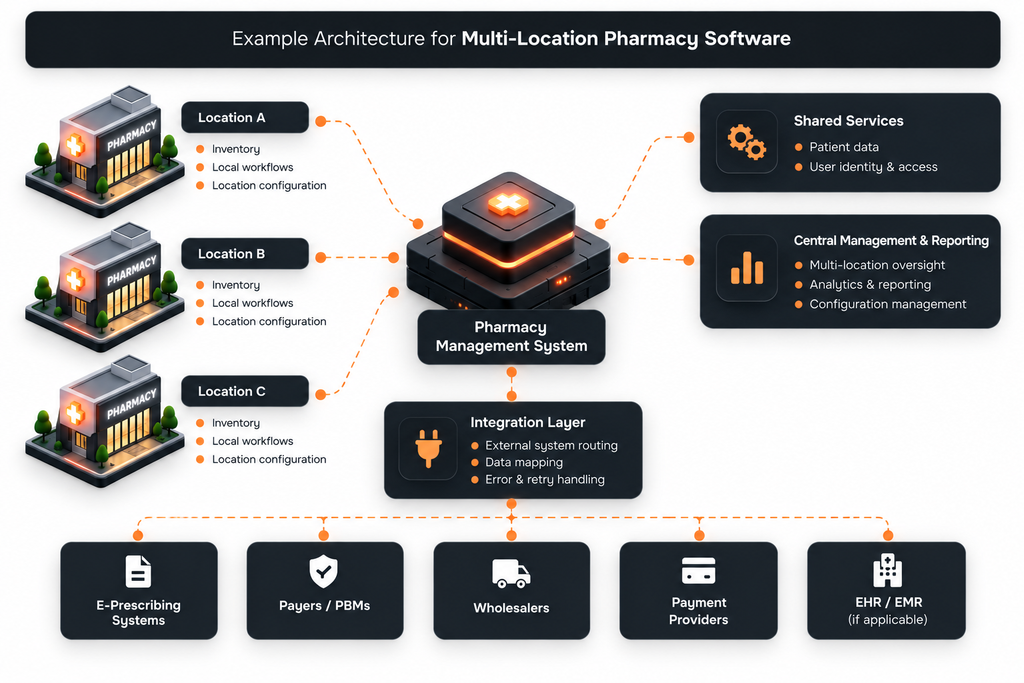
Some operations remain tied to individual locations, while other capabilities need a broader view of the pharmacy business. External integrations still need to know which location is behind a transaction, even when they are managed through a common integration layer. The blocks represent responsibilities, not necessarily separate applications, services, or databases.
Security and compliance across multiple locations
Supporting several locations increases the number of situations in which the system has to decide who can access data and what they can do with it. A user’s role matters, but so can the location, type of data, requested action, and current workflow.
- Authentication and access control. Permissions should reflect the scope of a user’s responsibilities. Access to one location does not necessarily provide the same access elsewhere.
- Audit trails. Important actions should retain enough user, location, and workflow information to show what happened and where.
- Data protection. Sensitive patient, prescription, payment, and operational data needs appropriate protection when stored and exchanged.
- Integration security. Credentials and external-system access should be limited to the locations and operations that require them.
Compliance requirements depend on where the pharmacy operates, what data the system handles, and how it is used. Relevant requirements can include HIPAA in the U.S., PIPEDA and provincial privacy requirements in Canada, GDPR in Europe, and PCI DSS for environments that handle or can affect the security of cardholder data. Not every requirement applies to every pharmacy business or software environment.
When custom multi-location pharmacy software makes sense
Operating several locations is not, by itself, a reason to replace an existing system with custom software. Commercial products may already cover the required workflows. Custom development becomes more relevant when the operating model creates requirements that available systems cannot support without persistent workarounds.
- Cross-location workflows do not fit available products. Transfers, routing, approvals, or other processes may require logic that cannot be configured adequately in the existing system.
- Locations require substantially different configurations or integrations. Different providers, accounts, workflows, or local settings can make a standardized setup difficult to maintain.
- Legacy systems make a standard replacement difficult. Existing data and integrations may need to remain available while parts of the software are modernized gradually.
- New services require functionality or data access the current system does not provide. Custom workflows or access to additional data become product requirements rather than optional additions.
Custom development is only one option. Extending, integrating, or reconfiguring an existing pharmacy management system may be faster and less disruptive when its underlying capabilities already fit the business.
Conclusion
Multi-location pharmacy software becomes more complex when processes cross location boundaries but responsibility for them still has to remain clear. This affects inventory transfers, prescription workflows, integrations, permissions, and reporting in different ways.
A good architecture accounts for these differences instead of treating every pharmacy as either completely independent or part of one undifferentiated system. This gives the business centralized oversight while allowing each location to operate within the rules and workflows that apply to it.
FAQ
What is multi-location pharmacy management software?
Multi-location pharmacy management software supports operations across more than one pharmacy location while coordinating shared data, centralized management, and location-specific workflows.
How is multi-location pharmacy software different from a standard PMS?
Software designed for a single pharmacy does not need to coordinate the same location-specific data, cross-location workflows, and configuration differences. Multi-location software also has to provide broader oversight without losing the operational context of individual pharmacies.
How does inventory management work across pharmacy locations?
Inventory can be visible across the business while stock quantities remain tied to the location where items are physically held. Transfers are tracked as workflows so stock does not appear available at the destination before it has been received.
Can pharmacy locations share patient and prescription data?
They can where the pharmacy’s systems, operating model, permissions, and applicable requirements support it. Access to the data does not automatically give every location or user permission to modify it or process a prescription.
When should a multi-location pharmacy consider custom software?
Custom software is worth considering when important cross-location workflows, integrations, configuration requirements, or new services cannot be supported adequately by available products. The decision should depend on those requirements rather than the number of locations alone.